

How Lyff Works

Your important information, organised in a few simple steps.

Create your private digital vault, keep important dates in view and share selected information with the people you trust. Choose a plan for yourself, your partner or your family.

One place for your information

Set it up once. Keep it useful for years.

Lyff gives you a secure place to keep the documents, records and instructions you want to have available.

Keep household records, insurance, travel documents and wishes organised. Share selected items with your partner or spouse by appointing them as Guardian and choosing Share Now once they are active.

Complete covers one adult, Duo two and Circle up to four, with independent private vaults. Duo and Circle have one billing arrangement; each adult keeps their own login and permissions. Being on the same plan or paying for it does not automatically grant access.

Getting started

How Lyff works, step by step.

Choose your plan, organise your information and put the right access arrangements in place.

1

Create your account

Choose your plan, create your private vault and complete the account security setup, including MFA.

2

Add your information

Take a photo on your phone or choose an existing file or photo. On desktop, select a file or drag and drop one file at a time.

3

Organise your vault

Keep documents in relevant sections. Add an optional expiry, renewal or review date and choose your email reminders.

4

Choose who you trust

On paid plans, appoint your Guardian and Custodian. Choose which selected items they can access; appointment alone does not grant vault access.

5

Keep it up to date

Edit document dates and reminders, review your wishes and update access permissions as your circumstances change.

Protection starts on your device. Vault files are encrypted in your browser before upload, on phone and desktop. Your account password signs you in; your separate vault passphrase unlocks your vault.
Inside your Lyff

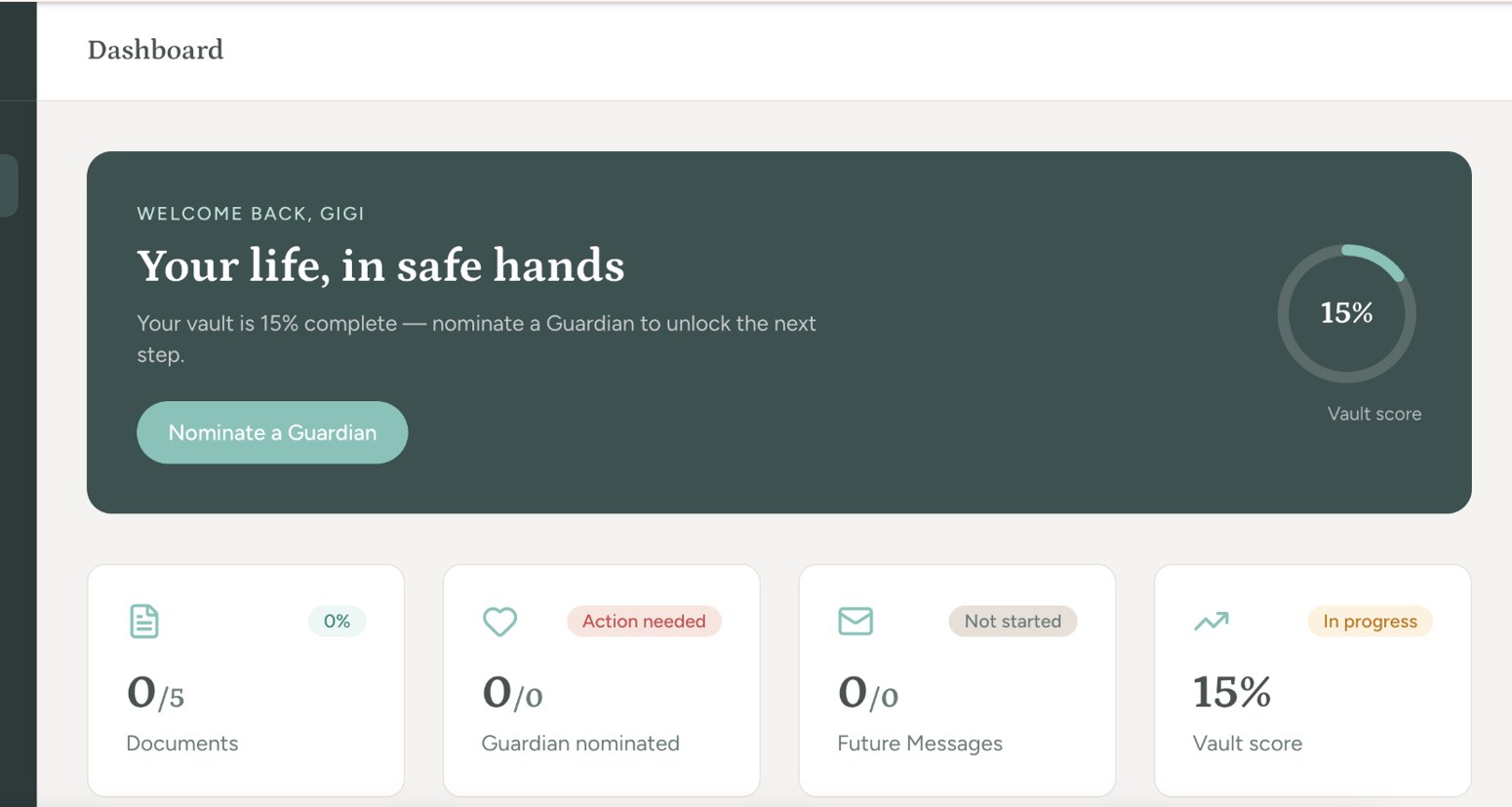
Everything starts with your dashboard.

Your dashboard is the starting point for managing your vault.

Manage your information and use the features included in your plan. Phone photos are automatically compressed before upload, with before and after sizes shown and an option to retake.

On desktop, Upload from your phone displays a QR code. Scan it and sign in on your phone with your password and MFA before taking a photo and saving it.

Compare Lyff plans →
Preview of the Lyff dashboard

Lyff dashboard preview

People you trust

Guardians and Custodians. What's the difference?

Both roles can help with access to selected information, but they serve different purposes.

People in a close personal relationship
Someone you trust

Guardians

A Guardian is someone you have a close personal relationship with, such as your partner, a family member or a trusted friend.

You invite them to become your Guardian. Once they accept and complete the required account security steps, their appointment becomes active. Guardian identity verification is required when they request release, rather than when they are appointed.

Important: A Guardian does not automatically receive access to your entire vault. You decide which items they can access.
Learn About Guardians →

Professional adviser with a client
A professional you trust

Custodians

A Custodian is a professional you choose, such as a solicitor or another eligible professional.

You nominate your Custodian and Lyff manages the invitation and professional verification process.

A Custodian can assist with access arrangements according to the permissions you set.

Important: A Custodian does not take ownership of your vault or receive unrestricted access to its contents.
Learn About Custodians →

You can change your Guardians or Custodian and review their permissions. Access following incapacity or passing requires additional verification and review.

Sharing & permissions

You decide what to share, who receives it and when.

Lyff offers different ways to share information, depending on what you need.

Share Now

Give an appointed Guardian or Custodian access to selected items in your vault.

You choose what they can see and can change or remove permissions.

Release Later

Assign selected information for incapacity, passing or both, with recipients chosen for the relevant event.

Requests require identity verification, supporting evidence and human review.

Future Messages

Write a message, add attachments and choose a future delivery date.

Send scheduled messages to anyone with an email address. They don't need to be a Guardian or Custodian.

Good to know: Private items are excluded from Guardian and Custodian access and from Release Later. Scheduled messages and vault sharing are separate features. Future Messages can be sent on a chosen date. Ordinary vault items cannot be scheduled for date-based release.
Access when circumstances change

What happens if someone requests access?

Lyff follows a review process before information can be released following incapacity or passing.

STEP 01

Request

Your Guardian or Custodian signs in to their own platform account and submits a request for the relevant release condition.

STEP 02

Verification

Lyff verifies identity and the relevant role. Supporting evidence is submitted and reviewed inside the platform.

STEP 03

Notification

After evidence is accepted, email and SMS notices are sent to you. A seven-day review period allows you to stop the proposed release.

STEP 04

Review & decision

Final human review and approval by a different manager are required. Only the items assigned to that person for that event can be released.

A missed Lyff Check-In does not initiate a release request or automatically contact a Guardian.

Learn more about the release process →
Ongoing life admin

Your life changes. Your vault can change with it.

Lyff isn't something you set up once and forget.

Set reminders 60, 30, 14 or 7 days before your chosen document date, or choose a custom date. 60 and 14 days are selected by default. Choose Repeat annually for yearly renewals. After upload, a confirmation shows the reminders set.

Use Document details to edit a date or reminders, or turn them off. Settings lets you switch all reminders off while keeping dates. Reminders cover the five documents on the 12-month Free plan and all documents on paid plans. No reminder emails are sent during the grace period. Emails contain no file contents or sensitive details.

Lyff Check-In is a separate six-monthly prompt to review your information.

Explore Reminders
Update documents and personal records
Review wishes and schedule Future Messages
Change Guardians or Custodians
Review or remove sharing permissions
Manage document dates and reminders
For you. For your partner. For your family.

A more organised life. A better prepared family.

Bring documents, important dates, wishes and messages together. Share selected information with your partner or spouse and prepare the details your trusted people may need in the future.

Choose Complete for yourself, Duo for two adults or Circle for up to four. Each adult keeps their own private vault and controls their own sharing.

Private by default Australian hosted Selected sharing